StandBy - A bedside clock for Android
A bedside clock that opens by itself when the phone is charging on a stand, with a gallery of faces, weather, calendar, photos and an optional notification row.
StandBy turns a phone that is charging on a stand into a bedside clock. Set it down in landscape and the clock appears over the lock screen; rotate it upright or unplug the cable and it closes again. There is nothing to launch, unlock or remember.
It grew out of leaving my own phone on a stand overnight and getting the lock screen: dim, cluttered with notifications, and the one thing I wanted at 3am buried under the one thing I did not.
How it works
- Opens by itself: charging, landscape, screen off, and the clock comes up over the lock screen. A background watcher started at boot checks the charger, lock state, display state and orientation before it does anything.
- Gets out of the way: rotate the phone upright, unplug it, or unlock it and the clock closes.
- On your hours: an optional auto-launch window keeps the clock to the hours you sleep, and auto-off closes it after a set time so a stand left alone all day does not stay lit.
- Quick Settings tile: toggles the watcher without opening the app.
Faces
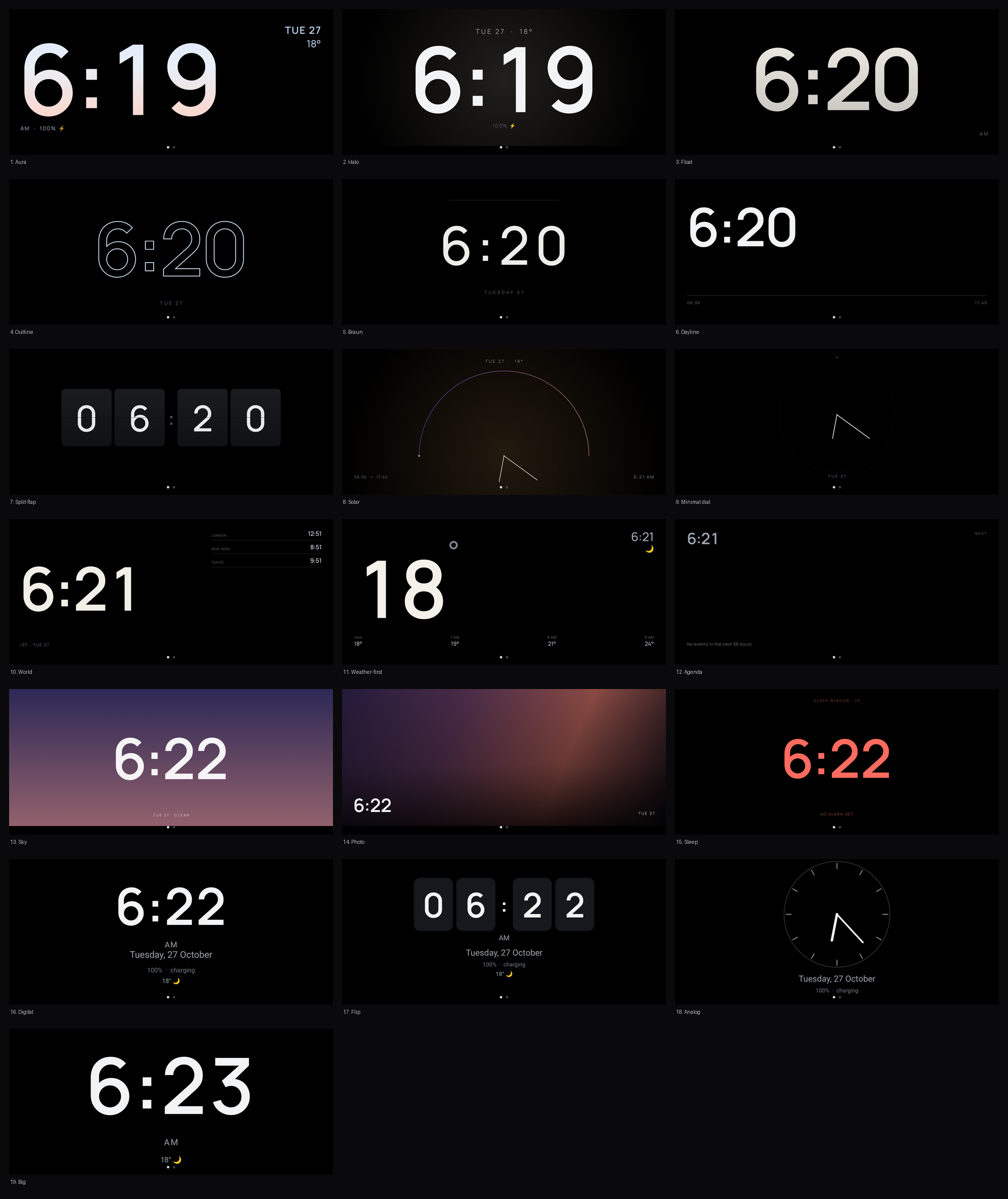
The face picker is a gallery of live miniatures, drawn by the same code as the clock, so a thumbnail cannot disagree with what you get.
- Some faces set the time as large as the frame allows. Others are quieter: a flip board, a minimal dial, hollow outline digits for the least light a panel can give.
- One shows the time in other cities, one lists the next calendar events, one leads with the temperature, and one puts a photo behind the time.
- The night face stays red-only and says when to go to bed to meet your alarm.
One font and one ink color apply across the faces, and double-tap cycles through them.
Pages
Swiping past the clock reaches optional pages, all off by default:
- Weather and battery: current conditions, the next few hours, a rain line, sunrise and sunset, and battery percentage with a bolt while charging.
- Calendar: the next events, read on the device.
- Photos: a folder of your choosing, crossfading with a slow pan.
Weather comes from Open-Meteo without an API key. The city is detected from your network or picked with a search box, and sunrise, sunset and rain all follow the same forecast.
Notification row
Optional, off by default. A row of app icons at the top of the clock, with a +N when more are waiting, so you can see that something arrived without reading it.
It reads the live notification list and keeps only the package name, the count and the small icon. No titles, no senders, no text, nothing written to disk. StandBy’s own notifications and system notices are left out, and so is anything you cannot clear.
At night
A phone screen at 60% brightness in a dark room is a flashlight. StandBy dims itself to a low level after a set time.
Night mode tints the clock warm red inside hours you choose, using the ambient light sensor so it only applies when the room is dark. It is opt-in, as is overnight blanking, which fades the screen to true black once you have settled; a tap or a nudge brings it back. Adaptive brightness follows the light in the room, and a slow pixel drift keeps the same digits from burning into the same pixels.
Permissions
Each permission has one job, and this is the full list:
- Display over other apps: lets the clock open over the lock screen. It is never used to draw on top of anything else.
- Notifications: Android requires a visible notification while the background watcher runs. It is set to minimum importance.
- Notification access (optional): the app icons in the notification row above.
- Unrestricted battery (optional): keeps the watcher alive overnight while charging.
- Run at startup: restarts the watcher after a reboot.
- Calendar (optional): shows your next events on the clock.
- Photos (optional): shows a folder you pick, with Android’s own folder chooser.
Privacy
- No accounts, no ads, no analytics, no tracking.
- Settings, calendar events, photos and notification icons stay on the device. Notification content is never read, stored or sent.
- The only network requests are weather and city lookup. Without a chosen city, none are made.
- Diagnostics stay on the device until you clear them, and are shared only if you tap “Share diagnostics”.
Requirements
Android 10 or newer. Built and tested on a Galaxy S25 Ultra running One UI 9, on the stand it was written for. Free, with no ads and no in-app purchases.